> For the complete documentation index, see [llms.txt](https://quantsedge.gitbook.io/quantsedge-docs/llms.txt). Markdown versions of documentation pages are available by appending `.md` to page URLs; this page is available as [Markdown](https://quantsedge.gitbook.io/quantsedge-docs/trading-bots/dashboard-overview.md).
# Dashboard Overview
Your command center for managing bots, monitoring performance, and analyzing markets.
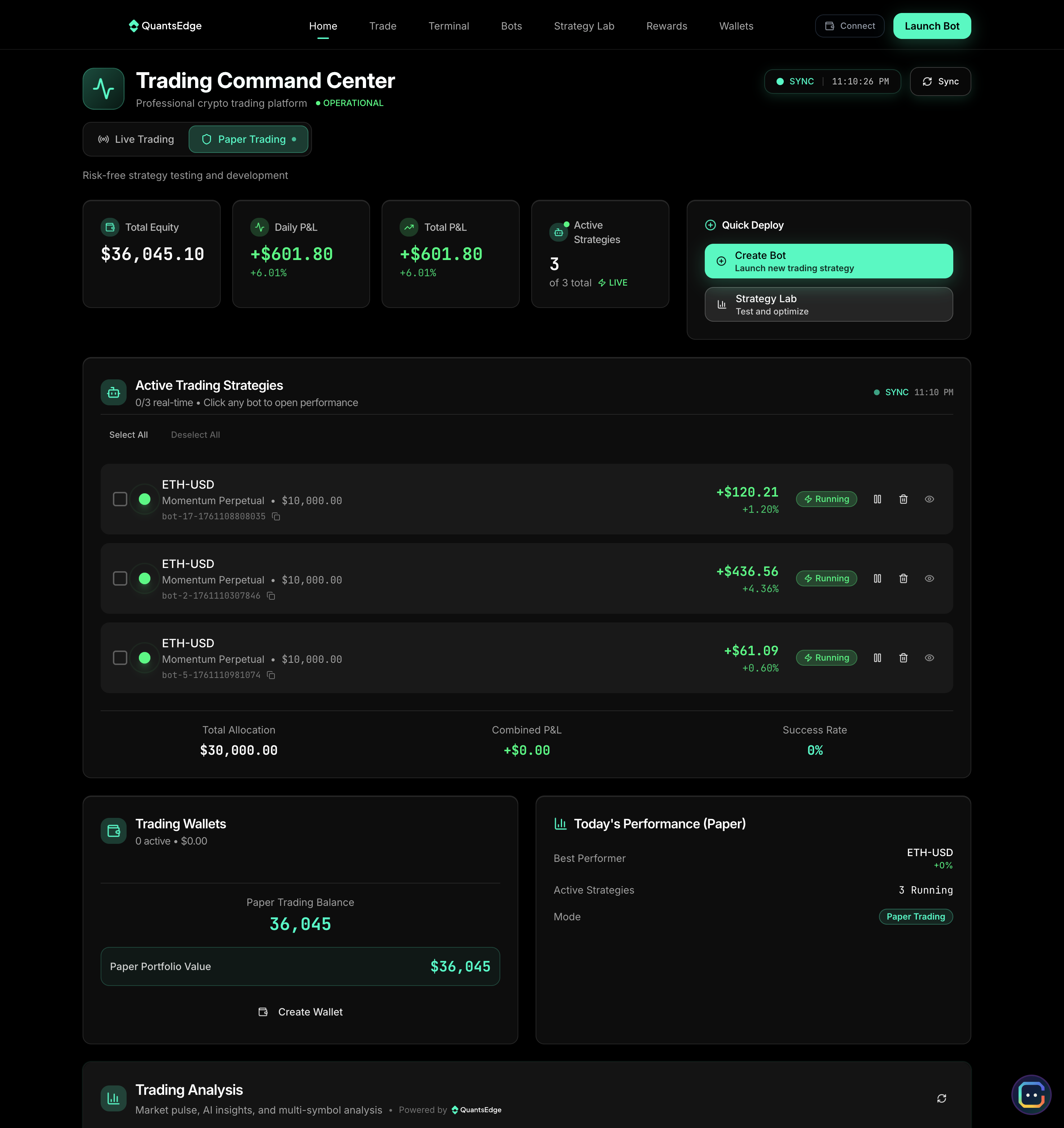
## Dashboard Layout
**Six key sections:**
1. Portfolio Overview: Account value, P\&L, positions
2. Active Bots: Running strategies and status
3. Market Data: Real-time prices and charts
4. Performance Metrics - Returns, analytics
5. Trade History: Execution log
6. Alerts & Notifications: Important events
## Portfolio Overview
### Account Summary
| Metric | What It Shows |
| ------------------------- | ------------------------------- |
| **Total Portfolio Value** | All positions + cash, real-time |
| **Daily P\&L** | Today's profit/loss ($ and %) |
| **Available Balance** | Cash for new positions |
| **Total Exposure** | Sum of all open position values |
### Open Positions
**Each position card displays:** Complete position information including trading pair, entry price, current price, position size, unrealized P\&L, time held, and strategy name for comprehensive position tracking.
**Quick actions:** Instantly close positions, adjust stop/target levels, or view detailed position information with a single click for efficient position management.
## Active Bots
### Bot Status Cards
**Each bot shows:** Essential bot information including name, strategy type, trading pair, current status, today's trade count, today's P\&L performance, and number of active positions for comprehensive bot monitoring.
### Status Indicators
| Status | Meaning |
| -------------- | ---------------------------------------- |
| 🟢 **Running** | Actively monitoring and trading |
| 🟡 **Paused** | Monitoring but not opening new positions |
| 🔴 **Stopped** | Completely inactive |
| ⚠️ **Error** | Requires attention |
**Quick controls:** Pause/resume, stop, view settings, check history, access analytics
### Performance Summary
**Key metrics:** Total return, trade count, win rate, active positions, risk metrics
**Time filters:** Today, week, month, all-time, custom range
## Market Data
### Live Price Feeds
**Real-time display:** Live market information including current bid/ask prices, last trade price, 24-hour change percentage, 24-hour volume, and price trend indicators for comprehensive market analysis.
**Watchlist:** Add favorite trading pairs for quick monitoring, access one-click charts for instant analysis, and set custom alerts for price movements and trading opportunities.
### Price Charts
**Chart types:** Professional candlestick, line, and area charts for different analysis preferences and trading styles.
**Timeframes:** Multiple timeframes from 1-minute to daily charts (1m, 5m, 15m, 1h, 4h, daily) to analyze both short-term and long-term price movements.
**Indicators:** Comprehensive technical analysis tools including moving averages, RSI, Bollinger Bands, volume analysis, and MACD for advanced market analysis.
**Controls:** Full chart functionality including zoom, pan, add/remove indicators, change timeframes, and full-screen mode for detailed analysis.
## Performance Metrics
### Analytics Dashboard
**Overall performance:** Comprehensive performance metrics including total return percentage, total P\&L in dollars, win rate statistics, total number of trades executed, and average profit per trade for complete performance analysis.
**Risk metrics:**
* Current drawdown, max drawdown
* Sharpe ratio, risk-reward ratio
* Exposure %
**Equity curve:** Portfolio value over time, compare to benchmarks
### Strategy Breakdown
**Per-strategy analysis:** Detailed breakdown of returns by strategy type, individual bot win rates, trade frequency and average holding times, and profit factor analysis for comprehensive strategy evaluation.
**Comparison view:** Side-by-side bot comparison to identify best and worst performers, with allocation recommendations based on performance data and risk characteristics.
## Trade History
### Execution Log
**Each trade shows:** Complete trade information including date/time, trading pair, buy/sell direction, quantity traded, entry/exit prices, P\&L realized, strategy/bot identification, and order type for comprehensive trade tracking.
**Filters:** Advanced filtering options by date range, trading pair, specific bot, profit/loss status, and trade status for efficient trade analysis and reporting.
**Export:** Multiple export formats including CSV, Excel, and tax-compliant formats for accounting and analysis purposes.
### Order Details
**Click any trade for:** Detailed trade analysis including full execution details, slippage and fee breakdown, market conditions at time of trade, strategy signal that triggered the trade, and custom notes/tags for comprehensive trade review.
## Alerts & Notifications
### Alert Center
**Notification types:**
| Priority | Examples |
| -------------------- | --------------------------------------------------------------------------------- |
| 🔴 **Critical** | Bot stopped, stop loss hit, loss limit reached, liquidation risk, security alerts |
| 🟡 **Important** | Position closed, profit target hit, margin call, high drawdown |
| 🟢 **Informational** | New trade, daily summary, market alerts, bot status changes |
**Alert management:** Complete alert control including marking alerts as read/unread, archiving old alerts for organization, filtering by alert type or specific bot, and configuring notification preferences for personalized alert management.
## Quick Actions
**From dashboard:** Quick access to essential trading functions including launching new bots, opening positions manually, pausing all active bots, emergency stop all trading, exporting data for analysis, and viewing detailed analytics for comprehensive trading control.
## Customization
**Dashboard settings:** Complete customization options including rearranging dashboard sections, showing/hiding panels based on preferences, setting default timeframes for charts, choosing preferred chart types, and configuring auto-refresh intervals for personalized dashboard experience.
**Themes:** Light, dark, auto
***
**Your trading hub:** Everything you need to manage positions, monitor bots, and analyze performance in one place.
---
# Agent Instructions
This documentation is published with GitBook. GitBook is the documentation platform designed so that both humans and AI agents can read, navigate, and reason over technical content effectively. Learn more at gitbook.com.
## Querying This Documentation
If you need additional information that is not directly available in this page, you can query the documentation dynamically by asking a question.
Perform an HTTP GET request on the current page URL with the `ask` query parameter, and the optional `goal` query parameter:
```
GET https://quantsedge.gitbook.io/quantsedge-docs/trading-bots/dashboard-overview.md?ask=&goal=
```
`ask` is the immediate question: it should be specific, self-contained, and written in natural language.
`goal` is optional and describes the broader end goal you are ultimately trying to accomplish on behalf of the user. GitBook uses it to tailor the answer towards what is most useful for that goal.
The response will contain a direct answer to the question and relevant excerpts and sources from the documentation.
Use this mechanism when the answer is not explicitly present in the current page, you need clarification or additional context, or you want to retrieve related documentation sections.