> For the complete documentation index, see [llms.txt](https://quantsedge.gitbook.io/quantsedge-docs/llms.txt). Markdown versions of documentation pages are available by appending `.md` to page URLs; this page is available as [Markdown](https://quantsedge.gitbook.io/quantsedge-docs/trading-bots/bot-management.md).
# Bot Management
Control and monitor your trading bots with QuantsEdge's comprehensive bot management tools.
## Bot Dashboard
Access all your bots from **Bots** in the main navigation.
### Bot Status Indicators
| Status | Meaning | Actions Available |
| ---------- | ------------------- | -------------------------- |
| 🟢 Running | Active trading | Pause, Stop, Edit Settings |
| ⏸️ Paused | Temporarily stopped | Resume, Stop, Edit |
| 🔴 Stopped | Inactive | Start, Delete, Clone |
| ⚠️ Error | Requires attention | View Logs, Fix, Restart |
## Starting and Stopping Bots
### Start a Bot
1. Navigate to **Bots** and select your desired bot
2. Click **Start** to initiate trading
3. Review and confirm all settings
4. Bot begins trading within 30 seconds
**Pre-Start Checklist:** Ensure you have sufficient funds in your trading wallet, verify that risk limits are properly configured, confirm market hours are appropriate for your strategy, and validate that all strategy parameters are set correctly.
### Pause a Bot
**Pause vs Stop:** Pausing a bot stops new trades while keeping existing positions open, allowing you to temporarily halt trading without closing profitable positions. Stopping a bot closes all positions and completely halts trading activity.
**To Pause:** Select your running bot, click **Pause**, and new orders will stop immediately while existing positions remain active. This is useful for temporary market conditions or when you want to review performance before continuing.
### Stop a Bot
1. Select your bot and click **Stop**
2. Choose your exit strategy: Market orders for immediate execution or limit orders for better pricing
3. Confirm the stop action
**Stop Time:** The bot will complete all position closures within 10-60 seconds, depending on current market conditions and liquidity.
## Monitoring Bot Performance
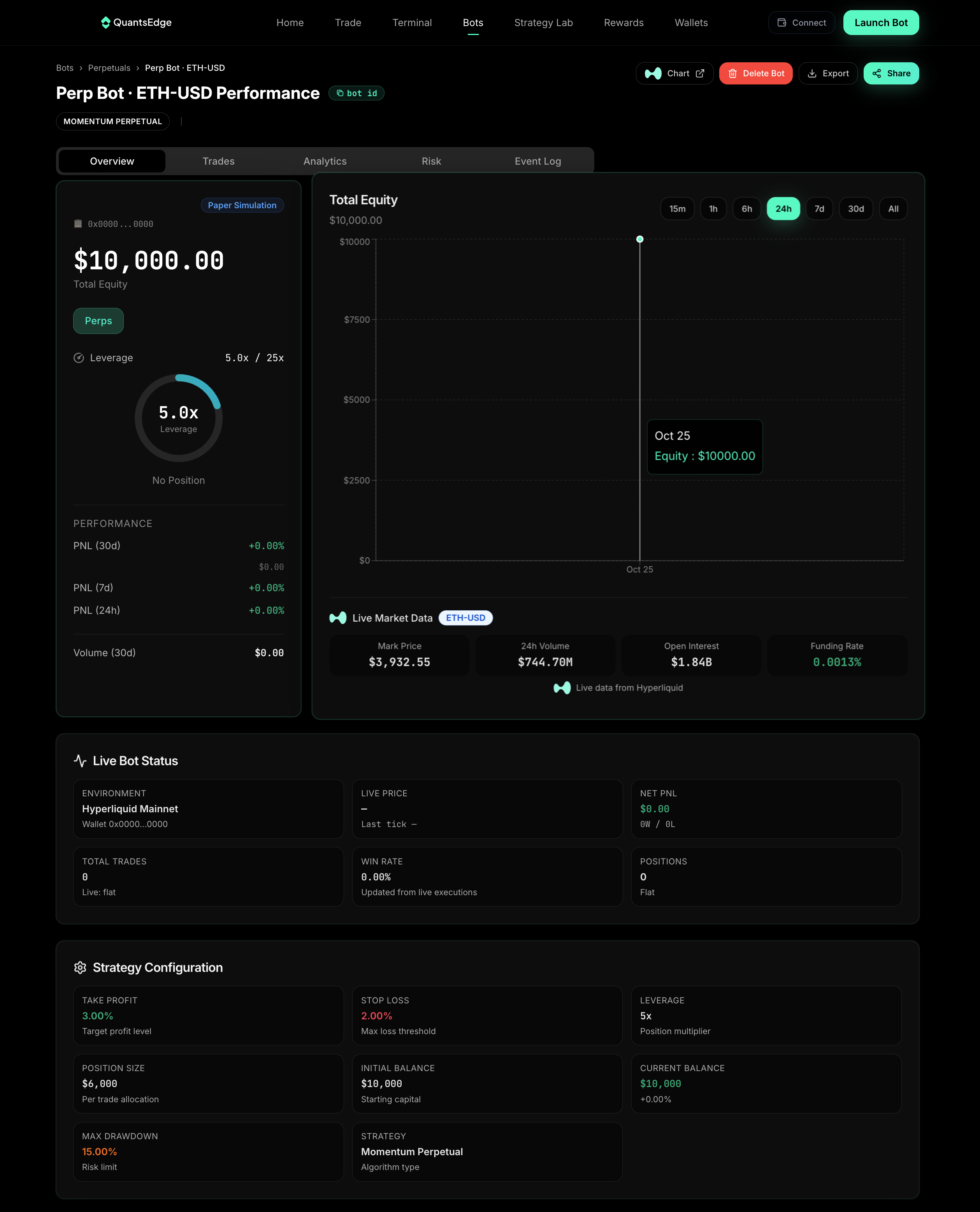
### Real-Time Metrics
**Key Performance Indicators:** Monitor your bot's total P\&L (profit/loss), win rate percentage, number of active positions, daily trading volume, and Sharpe ratio to assess overall performance and risk-adjusted returns.
### Activity Feed
**Track Every Bot Action:** The activity feed provides real-time visibility into all bot activities including orders placed and filled, position entries and exits, risk limit triggers, strategy adjustments, and error notifications. This comprehensive log helps you understand exactly what your bot is doing and when.
### Performance Charts
**Available Visualizations:** Equity curve over time, daily P\&L distribution, win/loss ratio trends, position size history
## Editing Bot Settings
### Safe Editing
**Can Edit While Running:** Risk limits (max loss, position size), trading hours, notification preferences **Requires Stop:** Strategy type, trading pair, leverage settings, core parameters
### Configuration Changes
1. Select bot
2. Click **Settings**
3. Modify parameters
4. Save changes
5. Restart if required
**Changes take effect:**
* Immediately: Risk limits, notifications
* After restart: Strategy, leverage, pair
## Multiple Bot Management
### Running Multiple Bots
**Best Practices:** Diversify across markets, don't exceed total risk limit, monitor aggregate exposure, stagger trading hours if needed
**Limits:** Free: 3 concurrent bots, Pro: 10 concurrent bots, Enterprise: Unlimited
### Bulk Actions
Manage multiple bots at once: Pause all bots, stop all bots, update risk limits across bots, export performance reports
**Access:** Bots → **Bulk Actions** menu
## Bot Cloning
Duplicate successful bots: 1. Select bot to clone, 2. Click **Clone**, 3. Modify name and parameters, 4. Start cloned bot
**Use Cases:** Test variations of working strategies, scale up successful configurations, and run the same strategy on different trading pairs to diversify your portfolio.
## Error Handling
### Common Bot Errors
| Error | Cause | Solution |
| ------------------ | ------------------ | --------------------------------- |
| Insufficient Funds | Low balance | Add funds or reduce position size |
| Order Rejected | Invalid price/size | Check market conditions |
| Connection Lost | Network issue | Bot auto-reconnects |
| Strategy Error | Invalid parameters | Review and fix settings |
### Auto-Recovery
**Automatic Actions:** Reconnect on network loss (max 3 attempts), retry failed orders (within 5 minutes), alert on critical failures, safe shutdown on persistent errors
### Manual Intervention
When bots require attention: 1. Check error notification, 2. Review activity logs, 3. Identify root cause, 4. Fix configuration or add funds, 5. Restart bot
## Bot Analytics
### Performance Reports
**Available Reports:** Daily/weekly/monthly summaries, trade-by-trade breakdown, strategy effectiveness analysis, risk-adjusted returns, comparative bot performance
**Export Formats:** CSV, PDF
### Backtesting Comparison
Compare live performance vs backtest to analyze expected vs actual returns, slippage impact, and detect any strategy degradation that may require adjustments or retirement.
## Bot Lifecycle
### Creation → Testing → Production
**Recommended Flow:** 1. Create bot with conservative settings, 2. Backtest thoroughly, 3. Paper trade for 1-2 weeks, 4. Start with minimal capital, 5. Scale gradually based on performance
### Retirement and Archiving
When to stop a bot: Consistently underperforming, market conditions changed, better strategies available, risk profile no longer appropriate
**Archive:** Settings saved for future reference
## Notifications and Alerts
### Configure Alerts
**Alert Types:** Trade executions, daily P\&L thresholds, risk limit hits, bot errors, performance milestones **Delivery Methods:** Push notifications (mobile), email, in-app notifications
### Custom Alert Rules
Create custom conditions: If P\&L > $X → Notify, if win rate < Y% → Alert, if drawdown > Z% → Emergency stop
## Best Practices
**Daily Routine:** Review overnight performance to identify any issues, check error notifications for immediate attention, verify sufficient funds for continued trading, and monitor market conditions for strategy appropriateness.
**Weekly Tasks:** Conduct performance analysis to assess bot effectiveness, optimize parameters based on recent results, review risk limits for appropriateness, and check overall strategy effectiveness in current market conditions.
**Monthly Actions:** Perform comprehensive performance review across all bots, consider strategy rotation or retirement for underperformers, reallocate capital based on performance, and backtest new strategy variations for potential improvements.
## Troubleshooting
### Bot Won't Start
**Checklist:**
* [ ] Sufficient wallet balance
* [ ] Valid strategy parameters
* [ ] No conflicting bots on same pair
* [ ] Risk limits properly set
* [ ] Market is open/tradeable
### Unexpected Behavior
**Debug Steps:**
1. Check activity logs
2. Review recent parameter changes
3. Verify market data feed
4. Test strategy in paper trading
5. Contact support if persistent
***
**Master bot management** to maximize your trading success. Regular monitoring and optimization are key to consistent performance.
**Need Help?** [FAQ](/quantsedge-docs/reference/faq.md) | [Contact Support](/quantsedge-docs/help-and-support/contact-and-support.md)
---
# Agent Instructions
This documentation is published with GitBook. GitBook is the documentation platform designed so that both humans and AI agents can read, navigate, and reason over technical content effectively. Learn more at gitbook.com.
## Querying This Documentation
If you need additional information that is not directly available in this page, you can query the documentation dynamically by asking a question.
Perform an HTTP GET request on the current page URL with the `ask` query parameter, and the optional `goal` query parameter:
```
GET https://quantsedge.gitbook.io/quantsedge-docs/trading-bots/bot-management.md?ask=&goal=
```
`ask` is the immediate question: it should be specific, self-contained, and written in natural language.
`goal` is optional and describes the broader end goal you are ultimately trying to accomplish on behalf of the user. GitBook uses it to tailor the answer towards what is most useful for that goal.
The response will contain a direct answer to the question and relevant excerpts and sources from the documentation.
Use this mechanism when the answer is not explicitly present in the current page, you need clarification or additional context, or you want to retrieve related documentation sections.